I Distilled Harness Engineering Into a SKILL
✨Article Summary (AI Generated)
The author shares his experience of distilling Harness Engineering knowledge into a reusable Agent Skill. After systematically studying sources from Anthropic, OpenAI, Martin Fowler, LangChain, and others, he identified seven core layers of harness design: project setup, context engineering, constraints & guardrails, multi-agent architecture, evaluation & feedback, long-running tasks, and diagnostics. The resulting harness-engineering skill covers three scenarios — new project scaffolding, diagnosing poor agent behavior, and continuous improvement — using a progressive-disclosure architecture. Quantitative evaluation showed 100% assertion pass rate with the skill vs. 83% without. The key insight: 80% of agent quality issues stem from harness gaps, not model limitations.
Why I Wrote This
Over the past two years, while using various AI coding assistants (Claude Code, Cursor, Copilot, etc.), I kept running into the same problem: Agent performance was inconsistent. While things have generally improved as models get better, the journey has been full of ups and downs.
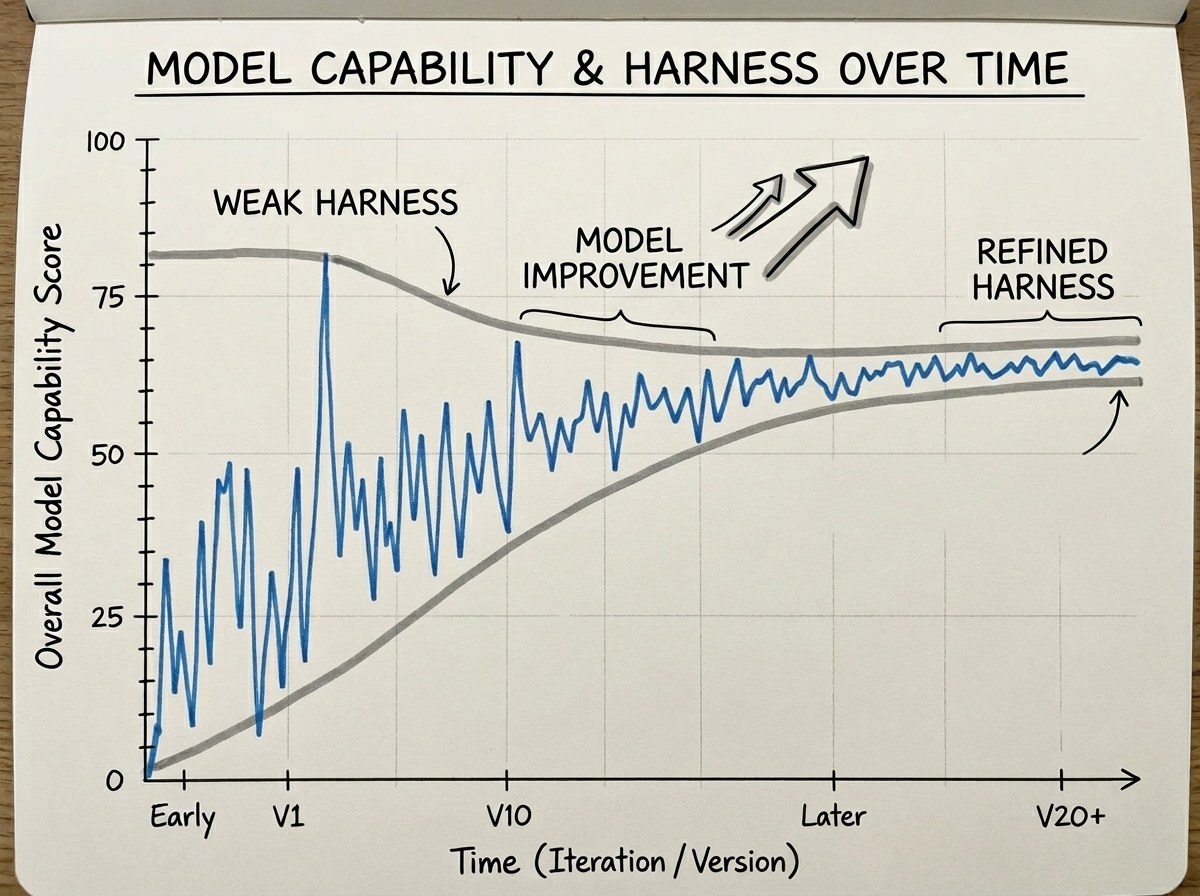
Sometimes the code it writes perfectly matches the project style. Other times it acts like an intern on their first day — unaware of the project structure, ignoring conventions, and forgetting decisions we'd already agreed on.
I started applying Prompt Engineering techniques like structured prompts, few-shot examples, and demonstrations to stabilize AI output. Then I moved on to Context Engineering to enrich the agent's context and further stabilize its performance.
In recent weeks, a more systematic term has emerged: Harness Engineering.
When an agent performs poorly, 80% of the time the issue isn't the model — it's the Harness. — Anthropic
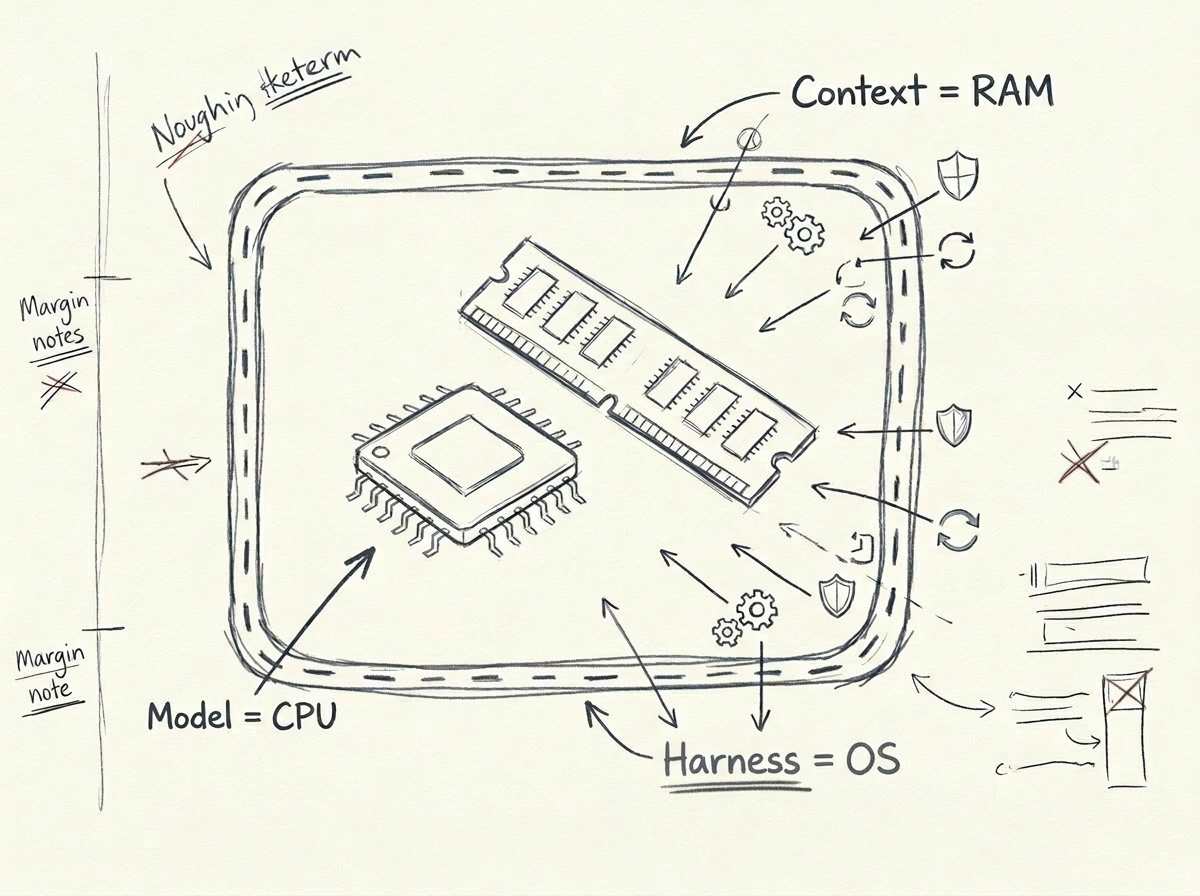
What is a Harness? Simply put:
- Model = CPU (the compute itself)
- Context Window = RAM (working memory)
- Harness = Operating System (scheduling, constraints, feedback, file system — all the infrastructure that makes the CPU work effectively)
You wouldn't expect a CPU to run efficiently on bare metal without an operating system. Similarly, you shouldn't expect a model to produce consistent output in a project without a Harness.
What I Learned
I systematically read articles from the following sources:
- Anthropic — Building effective agents, multi-agent research systems, harness design for long-running agents
- OpenAI — AGENTS.md design patterns, Context Engineering best practices
- Martin Fowler — The engineering philosophy of Harness Engineering ("Relocating Rigor")
- LangChain — Taxonomy of agent frameworks vs. runtimes vs. harnesses
- philschmid — The importance of Agent Harness in 2026
- Independent developers — Hermes Agent's self-evolution, Vue Lynx's design-notes-driven development
- Academic papers — Formalization of natural language agent harnesses
After reading everything, I found that while these articles approached the topic from different angles, their core ideas converged into seven layers:
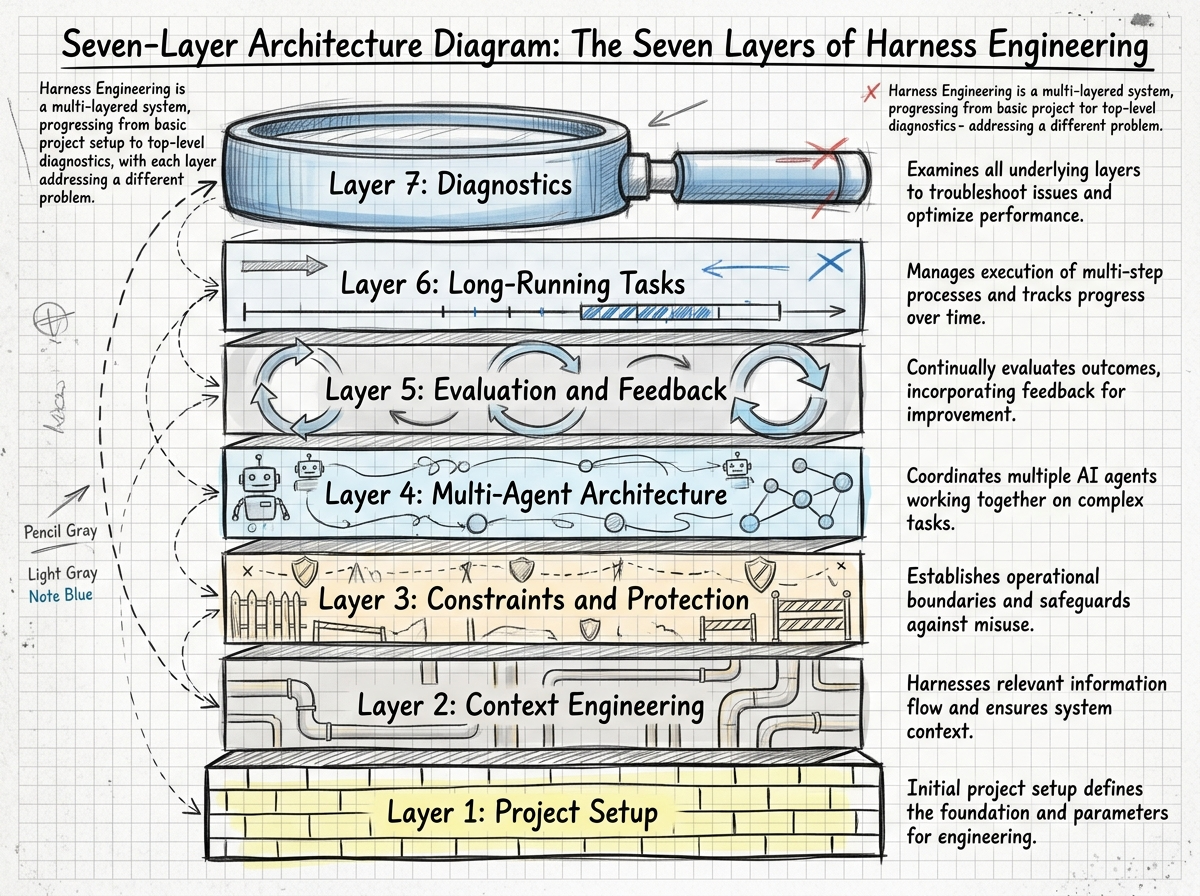
| Layer | What Problem It Solves | One-Line Summary |
|---|---|---|
| Project Setup | Agent doesn't know what the project is | AGENTS.md is a table of contents, not an encyclopedia |
| Context Engineering | Agent sees the wrong information | Give a map, not a manual |
| Constraints & Guardrails | Agent keeps making the same mistakes | Every mistake → add a rule |
| Multi-Agent Architecture | Single agent can't handle complex tasks | Clear division of labor, clear protocols |
| Evaluation & Feedback | Don't know if the agent is doing well | Let AI check AI |
| Long-Running Tasks | Agent drifts off course over time | Progress files + context resets |
| Diagnostics | Users complain the agent is bad | The problem is the Harness, not the model |
So I Built a Skill
After reading all these articles, I realized these patterns are entirely reusable. Whether your project is a React frontend, Python backend, or Rust CLI tool — the design principles of a Harness are universal.
So I distilled this knowledge into an Agent Skill called harness-engineering.
What It Does
This skill has three core use cases:
Scenario 1: New Project Setup
When you start a new project and tell the agent "help me set up Harness engineering," it will:
- Assess your project type, tech stack, and team size
- Create an
AGENTS.md(a table-of-contents-style agent navigation file) - Set up a
docs/directory (architecture, conventions, data models, etc.) - Configure the constraints layer (lint rules, type checking, pre-commit hooks)
- Set up evaluation and feedback mechanisms
Scenario 2: Diagnosing Poor Agent Performance
This is the most interesting scenario. When you start complaining —
- "Why does it keep making the same mistake?"
- "It completely ignores our conventions!"
- "The code quality is terrible"
This skill gets triggered and guides the agent to diagnose gaps in the Harness layer, rather than blaming the model:
| Your Complaint | Most Likely Cause | Fix |
|---|---|---|
| Keeps making the same mistake | No constraint preventing it | Add a lint rule |
| Doesn't follow conventions | Conventions aren't written down or agent can't find them | Write in docs/, reference in AGENTS.md |
| Forgets previous decisions | Cross-session context not persisted | Use progress.md to record decisions |
| Poor code quality | No examples of good code | Add examples in DESIGN_NOTES.md |
Scenario 3: Continuous Improvement
Every time a new reusable Harness pattern is discovered, update it in the skill so other projects can benefit too.
How It's Organized
The skill uses a progressive disclosure architecture:
harness-engineering/
├── SKILL.md              # Entry file (<60 lines), routes to specific references
└── references/
    ├── 01-project-setup.md       # Project setup
    ├── 02-context-engineering.md  # Context engineering
    ├── 03-constraints.md          # Constraints & guardrails
    ├── 04-multi-agent.md          # Multi-agent architecture
    ├── 05-eval-feedback.md        # Evaluation & feedback
    ├── 06-long-running.md         # Long-running tasks
    └── 07-diagnosis.md            # Diagnostics
SKILL.md itself is very concise — it acts like a router, directing the agent to read the relevant reference document based on the current scenario. This follows a core principle of Harness Engineering itself: progressive disclosure, load on demand.
Patterns That Impressed Me
A few patterns particularly resonated with me. Let me discuss them individually.
"Give a Map, Not a Manual"
I saw this concept in a tweet. The traditional approach is to write detailed step-by-step instructions (a manual) for the agent, but this makes the agent fragile — any deviation leaves it lost.
A better approach is to give the agent a map:
# Bad approach (manual)
Step 1: Open src/auth/login.ts
Step 2: Find the handleLogin function
Step 3: Add ... at line 42

# Good approach (map)
Auth system is in src/auth/. Login flow: login.ts → validate.ts → session.ts.
Rate limiting middleware is in src/middleware/rateLimit.ts — follow its pattern.
Every auth change needs a test in src/auth/__tests__/.
A map lets the agent navigate autonomously; a manual turns it into a fragile execution machine.
"Every Mistake → Add a Rule"
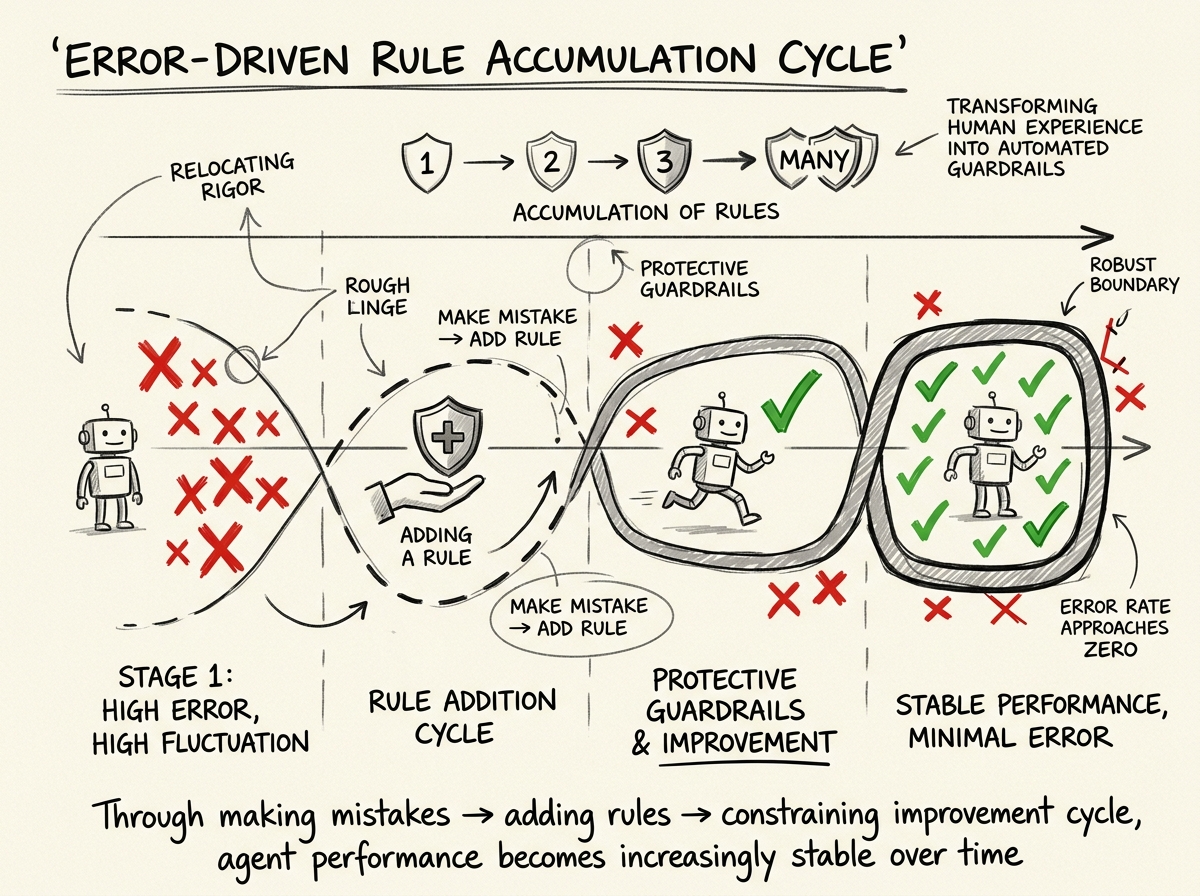
This pattern comes from cross-referencing multiple articles. The core idea:
- The agent makes a mistake
- You fix the mistake
- Then you add a rule to permanently prevent that type of mistake from happening again
This rule can be a lint rule, a type constraint, a test case, or simply a convention in the documentation. Over time, the Harness accumulates more and more rules, and the agent's error rate for known patterns approaches zero.
This is exactly what Martin Fowler calls "Relocating Rigor" — moving the quality gates that humans enforce through code review, experience, and intuition into automated checks. The agent runs freely within the checked boundaries.
Harness = Dataset
This perspective comes from Anthropic. Every agent interaction is a training signal:
- What it tried
- What succeeded
- What failed
- What the fix was
These traces are your competitive advantage. They're the data that makes your Harness better over time — not fine-tuning the model, but optimizing the operating system.
Skill Evaluation: Does It Work?
Following the skill-creator process, I conducted a quantitative evaluation of this skill. I designed 3 test scenarios, running with-skill and without-skill versions for each:
| Test Scenario | With Skill | Without Skill |
|---|---|---|
| New project setup | 6/6 ✅ | 4/6 |
| Agent behavior diagnosis | 6/6 ✅ | 5/6 |
| Cross-module dependency issues | 6/6 ✅ | 6/6 |
| Total | 18/18 (100%) | 15/18 (83%) |
The with-skill version passed all assertions in every scenario. The without-skill version had the most gaps in the "new project setup" scenario — it didn't know to create AGENTS.md, didn't know how to organize docs/, and couldn't set up the progressive disclosure context architecture.
Of course, a 17% difference isn't enormous. But the key point is: with the skill, the agent's output was consistent and complete; without it, results were hit or miss. For an engineering practice skill, consistency is more valuable than occasional brilliance.
How to Install
This skill can be installed via GitHub:
npx skills add 10xChengTu/harness-engineeringAfter installation, when working in Claude Code, OpenCode, or other agents that support Skills:
- Starting a new project → the skill auto-triggers to guide Harness setup
- Encountering agent quality issues → the skill intervenes for diagnosis when you start complaining
- Proactive inquiry → "Help me improve this project's Harness"
Final Thoughts
Harness Engineering is still a very early field. Models are getting stronger, and constraints needed today might be unnecessary tomorrow — so this skill itself follows a core principle: build for deletion.
If you're also doing development with AI Agents, try adding a Harness to your project. Start simple — an AGENTS.md file, a few lint rules, a progress.md. Then observe how the agent's performance changes.
You'll most likely feel the same way I do: It's not that the model isn't good enough — we just haven't given it a good working environment.
All referenced articles and the complete skill source code can be found in the GitHub repository.